
Email open rates hover around 20%. WhatsApp messages get opened over 95% of the time, usually within minutes. Yet most CRMs still treat WhatsApp as something you do outside the system — on your phone, copy-pasting from a spreadsheet.
We just shipped a WhatsApp module inside Alliances CRM that does two things from the same place:
- Send bulk personalised WhatsApp campaigns to a contact list.
- Chat 1-on-1 with any lead directly from their profile — every reply attached to the lead's timeline.
Here's how it works.
A Single Contact List for Every Campaign
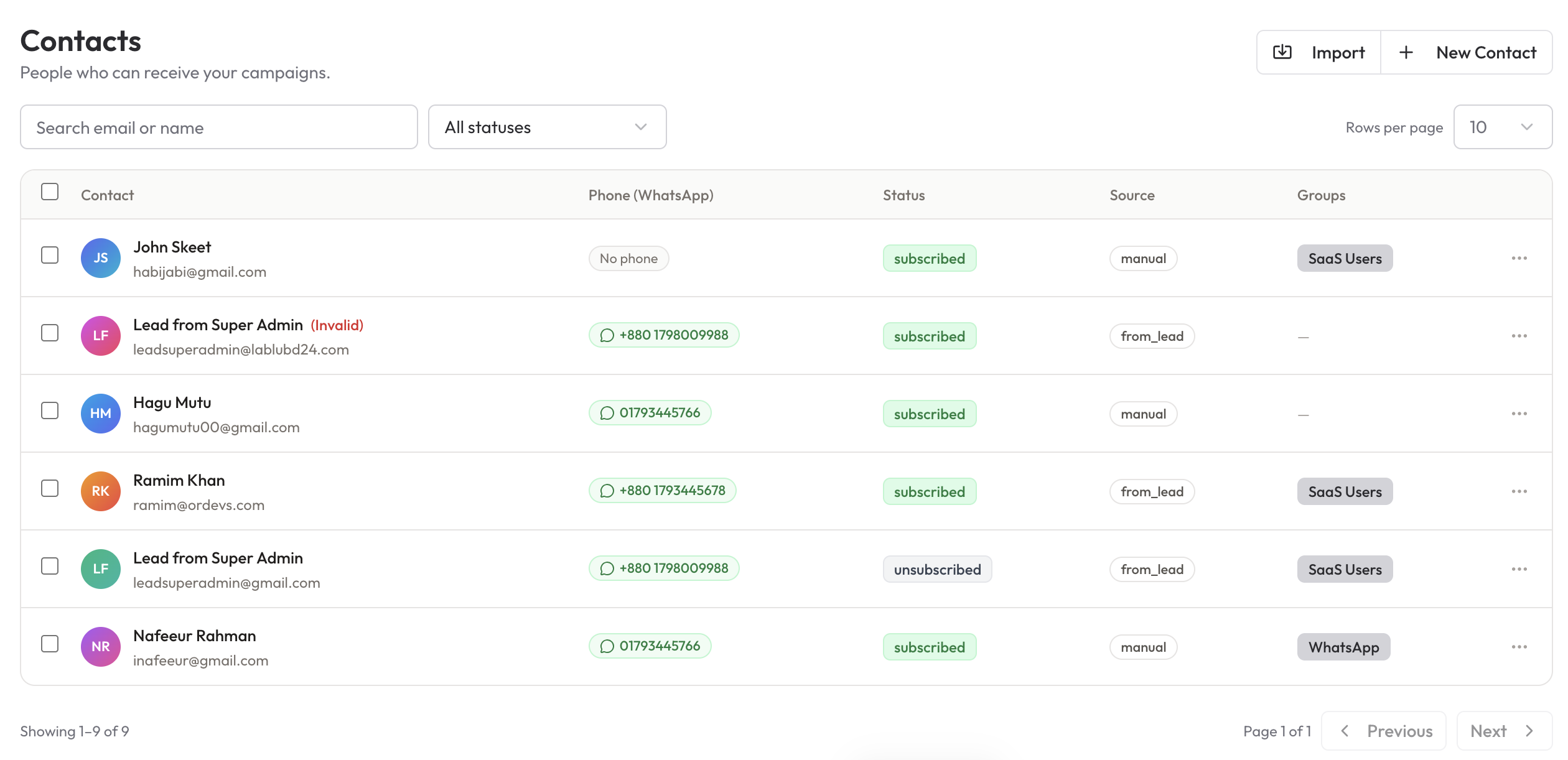
Before you send anything, you build a clean contact list. Contacts can be imported from CSV, added manually, or pulled in automatically from your existing leads — every contact carries a WhatsApp-valid phone number, a subscription status, a source (manual, from_lead, etc.), and one or more groups (e.g. SaaS Users, WhatsApp).
Why this matters:
- Unsubscribed contacts are blocked automatically. No accidental sends to people who opted out.
- Invalid phone numbers are flagged ("No phone", invalid format) before the campaign even starts — so you don't waste a send window on dead numbers.
- Groups become your segmentation layer. "Send to SaaS Users", "Send to WhatsApp-only", "Send to this trial cohort" — every campaign starts from a real, filterable list.
Build a Campaign in Under a Minute
Creating a campaign is intentionally boring. One form, four decisions:
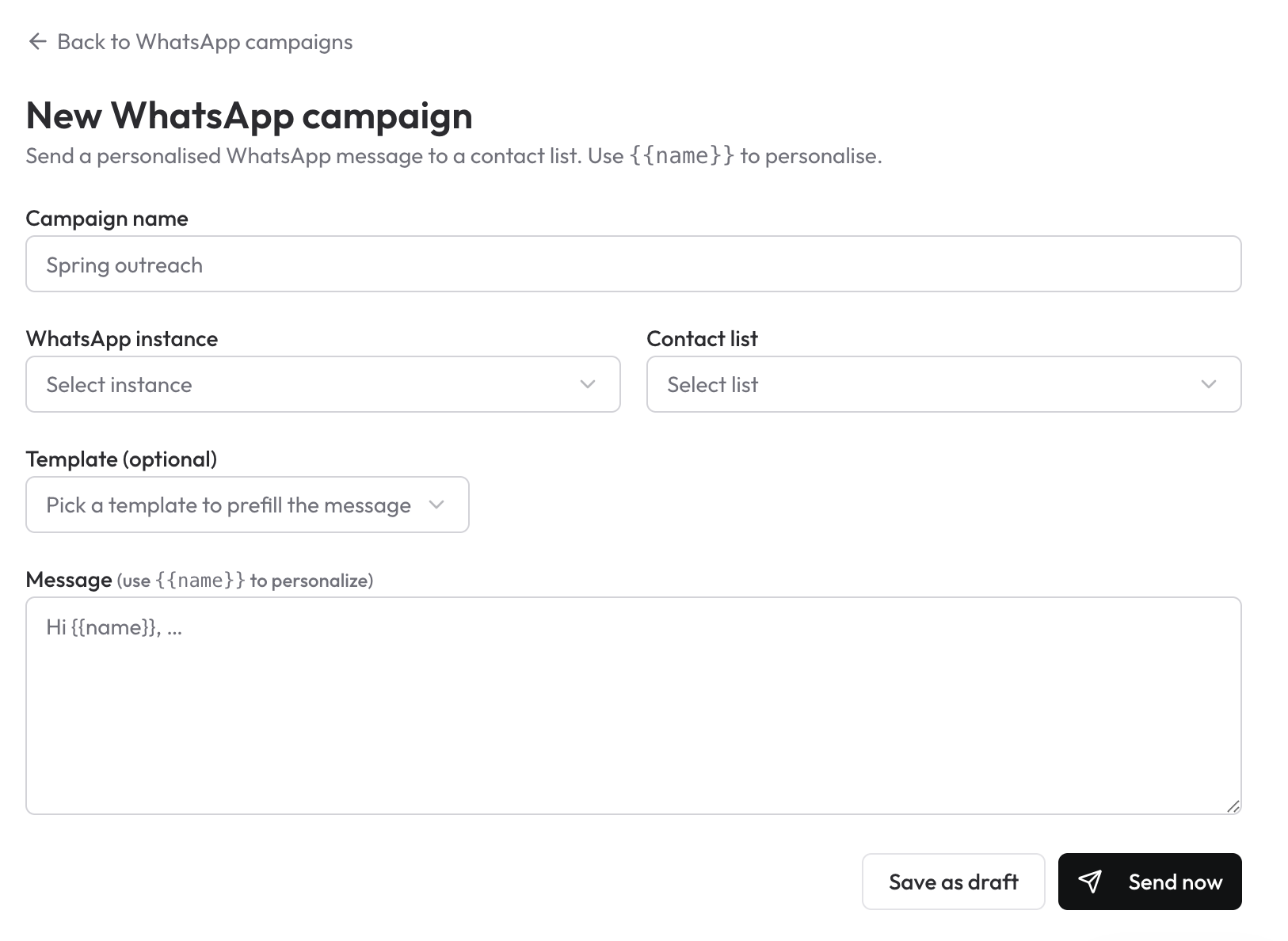
- Campaign name — for your own reference (e.g. Spring outreach).
- WhatsApp instance — which connected WhatsApp number this campaign sends from. Run multiple numbers in parallel without mixing inboxes.
- Contact list — the segmented list you built earlier.
- Template (optional) — reuse a proven message instead of writing it from scratch every time.
- Message — write once, use
{{name}}to personalise. Every recipient gets "Hi Sarah," instead of a generic "Hi there,".
Hit Send now to fire immediately, or Save as draft if you want to review before launch.
The
{{name}}token pulls from the contact's saved name. If the name is missing, the system falls back gracefully so the message still reads naturally — no awkward "Hi {{name}}," slipping through.
What separates this from a "bulk sender" tool
A lot of WhatsApp bulk tools live as standalone Chrome extensions or shady SaaS apps. They send and forget. The problem with that model:
- Replies land in your personal WhatsApp — disconnected from your CRM.
- There's no record of who said what or when.
- Two reps end up messaging the same lead with conflicting context.
The Alliances WhatsApp module solves this because every campaign send is also a CRM event. Replies route back to the lead's profile automatically.
Chat 1-on-1 from the Lead's Profile
Bulk is great for outreach. Closing is a conversation.
Every Lead and Contact inside Alliances now has a dedicated WhatsApp tab sitting right next to Tasks, Notes, Calls, and Emails. The conversation is full-duplex — incoming messages from the lead show up in real time, you reply directly from the CRM, and the count badge tells you exactly how many unread messages are waiting.
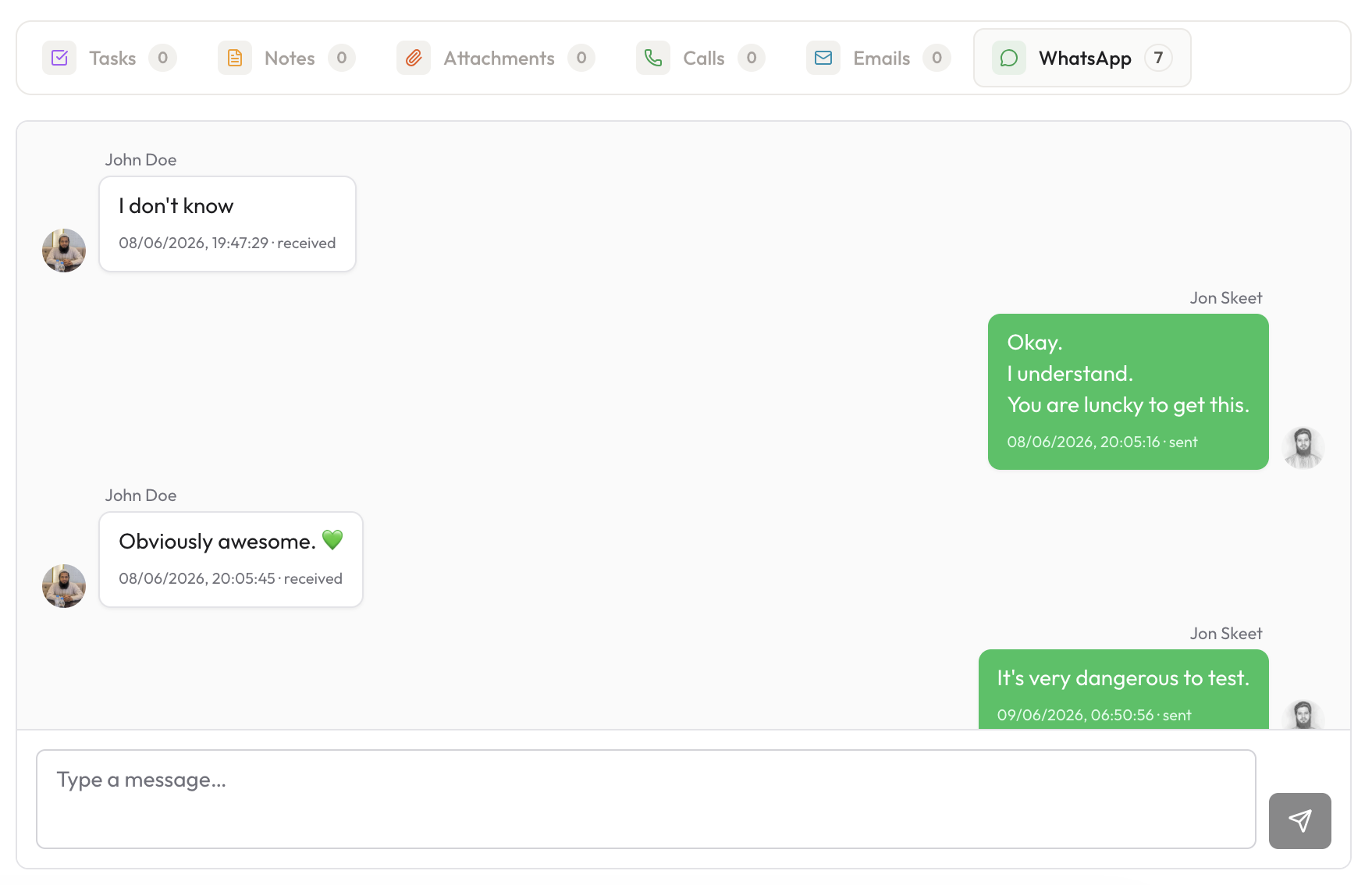
Three things to notice in the screenshot above:
- Every message has a status and a timestamp — received, sent, and the exact time. No more "did they read it?" guessing across three apps.
- The conversation stays attached to the lead forever. Hand the lead to another rep, come back six months later — the entire thread is there with the timeline, notes, and deals.
- A simple input at the bottom. You're not bouncing to your phone to reply. Type, send, done.
Why WhatsApp Beats Email for Service Businesses
A few patterns we've validated with early users:
| Channel | Typical open rate | Reply window |
|---|---|---|
| Cold email | 15–25% | Hours to days |
| WhatsApp campaign | 90%+ | Minutes |
| Phone call | ~30% (answer rate) | Real-time, but expensive |
For service businesses — cleaning companies, real estate agents, consultants, agencies, coaches — WhatsApp is often the channel the client already uses to coordinate. Meeting them there reduces friction:
- Appointment reminders with a one-tap reschedule reply.
- Quote follow-ups that don't get buried under promotional emails.
- Onboarding sequences that feel conversational, not transactional.
- Re-engagement campaigns for churned customers — typically 3–5× the reply rate of the equivalent email.
How the Bulk Send Works Under the Hood
A quick technical note for anyone evaluating delivery reliability:
- Each campaign runs through a queued worker — messages are spaced out automatically to keep your WhatsApp instance healthy.
- Delivery status is tracked per recipient: queued → sent → delivered → read (where available).
- Failed sends are retried with backoff. Permanent failures (e.g. invalid number) are surfaced on the campaign report so you can clean the contact list.
- The system respects per-instance rate limits so a campaign with 500 contacts doesn't get a single number throttled.
This is the same architecture pattern we use for the email module — it's just routed to a different delivery channel.
Email Campaigns Are Still There
If you've already built sequences in the Email Campaign module, nothing changes — both channels live side by side. The decision is per-campaign:
- Use Email for long-form content, newsletters, content drops, and prospects who haven't shared a phone number.
- Use WhatsApp for short, high-urgency, personal messages — and for any segment where you already know the channel works.
Many of our power users now run a two-step cadence: cold email first to seed interest, then a personalised WhatsApp follow-up to the openers. Reply rates on the WhatsApp step are routinely 6–8× the email step.
What's Next for the WhatsApp Module
A short roadmap of what we're shipping next:
- Media attachments — send images, PDFs, and short voice notes inside bulk campaigns.
- Scheduled sends — pick a future time for a campaign instead of "send now only".
- A/B testing — split a contact list and measure which message wins.
- Auto-reply rules — first-touch automation while a human catches up.
- Inbox view — a unified WhatsApp inbox across all your leads, not just per-profile.
Try It
The WhatsApp module is live for every workspace on a paid plan — Pro Monthly, Pro Annual, and Lifetime. Open your CRM, click into the Campaigns menu, choose WhatsApp, and your first campaign is one form away.
If you've been running WhatsApp outreach from your phone, a spreadsheet, and a sticky note — give the integrated version a week. We bet you don't go back.